Writing today is faster than ever. You can publish a blog post in a few hours, rewrite a paragraph in seconds, and “improve” a sentence with a single click. Yet, for many, writing feels heavier—not because the tools are missing, but because making the right decisions is harder.
QuillBot entered this landscape: an environment where people don’t struggle to produce words but to refine them. So what is QuillBot, really? Is it a shortcut? A writing crutch? Is QuillBot merely a useful tool?
In this guide, we’ll walk through how to use QuillBot step by step—and, more importantly, ask whether this tool serves your thinking or starts to replace it.
What Is QuillBot?
QuillBot is an AI-powered writing assistant designed to help users rewrite, refine, and improve existing text. Unlike generative AI tools that create long articles from scratch, QuillBot focuses on improving what you’ve already written.
Its core purposes are simple:
- Rephrase sentences
- Improve fluency
- Fix grammar
- Summarize long content
- Generate citations
It doesn’t create ideas—it reshapes them. And that distinction matters.
Who Should Use QuillBot?
QuillBot is especially useful for:
- Bloggers writing in English
- Affiliate marketers
- Students working on academic essays
- Freelance content writers
- Non-native English speakers
If you have something to say but struggle with expression, QuillBot can help. If you don’t have your ideas formed, it won’t solve that problem. Tools can improve clarity, but they can’t replace judgment.
How to Use QuillBot (Step by Step)
Step 1: Create an Account
- Go to the official QuillBot website.
- Click “Sign Up.”
- Register using your email or Google account.
- The free plan activates automatically.
For beginners, the free version lets you explore the core features easily.
Step 2: Understand the Dashboard
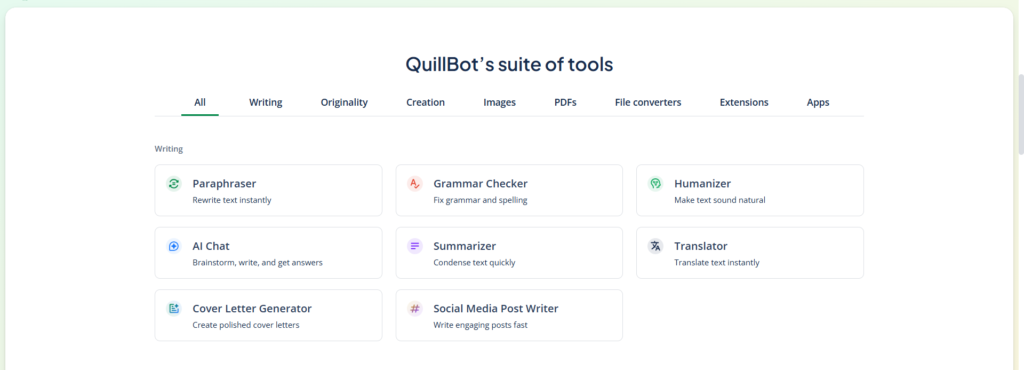
The interface is minimal and user-friendly.
- Paraphraser
- Grammar Checker
- Summarizer
- Citation Generator
- Co-Writer
Step 3: Using the Paraphraser
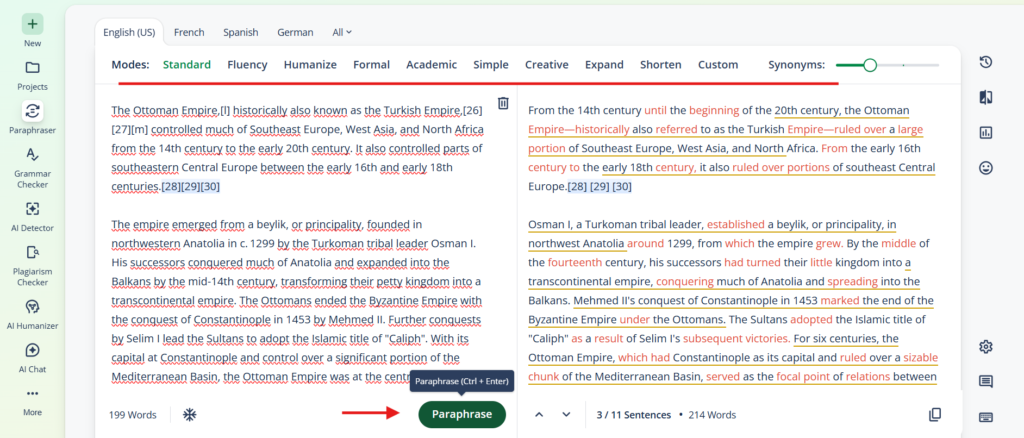
This is QuillBot’s most popular feature.
How it works:
- Paste your text into the left box.
- Choose a mode: Standard, Fluency, Formal, Simple, or (Premium) Creative.
- Click “Paraphrase.”
- Please review the updated version on the right.
Use this feature for:
- Repeated phrases
- Smoother English
- Adjusting tone
Note: If your original thought is unclear, the tool won’t clarify it—it’ll simply rearrange the confusion. This is where speed and quality can diverge.
Step 4: Grammar Checker
Please paste your text and run the grammar check. QuillBot highlights mistakes and suggests corrections. This is extremely helpful for non-native English writers.
But remember: grammar accuracy isn’t the same as strong writing. Perfect grammar can carry empty ideas.
Step 5: Using the Summarizer
The summarizer is practical for research, competitor analysis, academic reading, and long articles.
- Paste long text
- Choose “Key Sentences” or “Paragraph” mode
- Get a condensed version in seconds
In an age of information overload, this feature saves mental energy—but summarizing is not the same as understanding.
Step 6: Advanced Controls
The “Synonym Slider” is an important setting:
- Lower setting = minimal changes
- Higher setting = stronger rewriting
Higher levels can increase originality but also risk distortion. More variation doesn’t always mean more meaning.
Key Features Explained
1. Multiple Paraphrasing Modes
Different tones for different contexts:
- Formal for academic writing
- Standard for blog content
- Simple for clarity
Modes are helpful, but tone should follow intent—not replace it.
2. Synonym Control
Great for SEO writing. Adjust how aggressively the tool rewrites your content. Remember: rewriting isn’t originality. Originality starts with perspective.
3. Grammar Checker
Reliable for surface-level corrections. But surface improvements should come after deeper decisions. Clarity is technical; conviction is human.
4. Summarizer
Efficient for research-heavy writers. It eases the processing of information. But friction sometimes forces deeper thinking.
5. Co-Writer
Draft inside the platform with the Co-Writer environment. But ask yourself: are you using the tool, or is the tool shaping your thinking? Relying on prompts before forming ideas may lead to structurally clean but conceptually thin writing.
How to Get Better Results (Hybrid Model)
The most effective approach is hybrid:
- Write your draft yourself
- Use QuillBot to refine language
- Manually review every revision
- Restore your voice where needed
Use AI after making decisions—not before. Tools should support clarity, not replace direction.
When Should You Use QuillBot?
Use it when:
- You struggle with English fluency
- You want smoother transitions
- You need quick paraphrasing
- You produce consistent blog content
Avoid using it when:
- You haven’t formed your argument
- You want it to “generate” insight
- You plan to publish without reviewing
Modern production culture pushes speed. Affiliate marketing pushes scale. But sustainable writing pushes something else: intention.
So, Is QuillBot Worth Using?
The honest answer: yes—with limits.
It’s useful if:
- You write in English regularly
- You need help refining content
- You manage multiple articles
It’s unnecessary if:
- You write only in Turkish
- You already have strong fluency
- You expect it to think for you
QuillBot will not make you a better thinker. It might make you a more efficient editor—and that distinction defines everything.
In the end, tools are neutral. They amplify what’s already there. If your thinking is sharp, QuillBot strengthens it. The tool simply smoothes out weak thinking. And smooth is not the same as strong.
That decision still is yours.